No Money No Honey

跳到主文

Just Another Beginning

部落格全站分類:

  • 相簿
  • 部落格
  • 留言
  • 名片
  • 10月 30 週一 202315:26
  • IOS升級OPENVPN 3.4.0(5457)後SOPHOS連線異常問題

這陣子IOS升級OPENVPN至3.4.0(5457)後,SOPHOS的VPN忽然不能連線,查了一下果然是SOPHOS的BUG,但之前的OPENVPN版本怎沒問題呢?大概跟新版IOS的OPENVPN安全性更嚴謹有關,很抱歉,如果你有上千台設備,一台一台更新會死人。我的NG防火牆1.5.1版本的OPENVPN設定檔再IOS OPECVPN3.4.0版上連得上但是無法連線內網,目前還沒解決。

https://community.sophos.com/sophos-xg-firewall/f/recommended-reads/142427/sophos-firewall-temporary-fix-openvpn-3-4-0-unsupported-options-error

Temporary Fix

1. Access via SSH the Sophos Firewall

2. Press 5 > 3 in the Main Menu to land in the Advanced Shell

3. Enter the following line: vi /content/sslvpn/client-config-template.ovpn

The above command will open the file called client-configuration-template in the vi editor

4. Press the Down Arrow on your keyboard until you see the pointer is at "route-delay 4.",
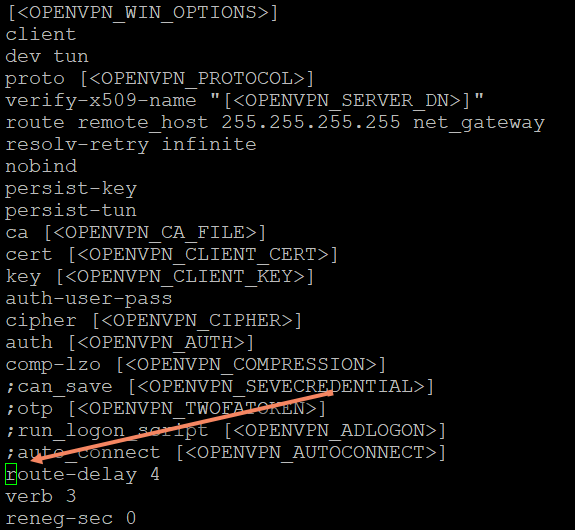
5. Press the letter "i" on your keyboard to enter INSERT mode in vi, and press the semicolon symbol (;) on your keyboard
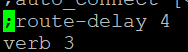
6. Press the key ESC on your keyboard followed by :x or:wq (you should see the :X On the left bottom corner of your screen (Advanced Shell)

After this change, ask the user to access the User Portal to re-download the configuration, and the user won't be presented with the Unsupported Options error when trying to connect.

Note: This won't survive a Firmware update, so you’ll need to re-enter the commands after doing a Firmware Upgrade

Note: Sophos is aware of this error and plans to work on fixing this in the upcoming v19.5MR4 and v20.0MR1.

For UTM Firewall, kindly check the the following link:


  • 全站分類:
  • 個人分類:OPENSSL
▲top

自訂側欄

PIXNET Logo登入
文章標籤
全站熱搜
創作者介紹
創作者 NoMoney NoHoney 的頭像
NoMoney NoHoney

No Money No Honey

NoMoney NoHoney 發表在 痞客邦 留言(0) 人氣(0)

自訂側欄

個人資訊

NoMoney NoHoney
暱稱:
NoMoney NoHoney
分類:
好友:
累積中
地區:

熱門文章

  • ()Windows系統日誌管理
  • ()公司部門英文縮寫簡稱大全(1)
  • ()簡單公式實現Excel自動編號
  • ()免費的頻寬限速軟體
  • ()DELPHI 字串函式大全
  • ()Delphi控制Excel範例大全
  • ()Client端GPO群組原則派送結果查詢(使用控制台的方式)
  • ()20170421-BENZ線上車身碼零件料號查詢系統
  • ()Chrome Line 無法複製訊息問題處理(更新重開機免重設方式)
  • ()如何從Windows 7升級到Windows 10 出現 0x80072F8F - 0x20000 問題排除

文章分類

  • Linux (76)
  • 新奇 (60)
  • DELPHI程式語言 (116)
  • Windows (180)
  • 電腦虛擬化技術 (112)
  • 科技 (52)
  • 電腦打版刺繡MARK、臂章 (8)
  • 娛樂 (52)
  • 閒聊 (288)
  • 電腦專有名詞 (4)
  • MySQL (8)
  • 知識 (24)
  • DOS (4)
  • 電腦和網際網路 (216)
  • 新聞及政治 (64)
  • 飲食 (24)
  • MSSQL (24)
  • 無料好用工具 (8)
  • EXCEL (4)
  • PHP (12)
  • 網頁設計 (8)
  • 網路設備 (12)
  • FTP (4)
  • 音樂 (8)
  • 遊戲 (4)
  • Postfix (28)
  • OFFICE (4)
  • W124 (56)
  • 養生 (4)
  • SERVER (28)
  • 政治 (44)
  • YAMAHA勁戰4代六期 (4)
  • RouterOS (12)
  • TOYOTA (4)
  • NAS (4)
  • SOPHOS XG (8)
  • Open-audit (8)
  • 政治與歷史 (52)
  • 政治垃圾 (240)
  • PC零組件 (8)
  • 鼠來寶 (4)
  • 生活 (24)
  • 不斷電系統UPS (4)
  • ANDRIOD (4)
  • 印表機 (4)
  • OSSIM (4)
  • OPENSSL (4)
  • OPENVPN (4)
  • 汽車 (4)
  • LINUX (4)
  • 未分類文章 (1)

最新文章

    動態訂閱

    文章精選

    文章搜尋

    誰來我家

    參觀人氣

    • 本日人氣:0
    • 累積人氣:0