移除或停用後重開機還是會自動安裝啟用,網路上找到這個方式可解
1. Click Start
2. Type Powershell and in the right hand side click ‘Run as Administrator’
3. Type:
netcfg –d
白話 用管理員模式執行POWERSHELL後,執行netcfg –d
移除或停用後重開機還是會自動安裝啟用,網路上找到這個方式可解 1. Click Start 白話 用管理員模式執行POWERSHELL後,執行netcfg –d |
無法看圖可到這邊 http://blog.infinity.idv.tw/?p=1892
一直用Untangle防火牆的OPENVPN免費套件來使用VPN,設定簡單,還可設定內部網段才走VPN,外部網路依舊走自己手機出去,近日IPHONE手機OPENVPN升級3.4.0後就發生可以連線但無法存取內部網段,Untangle 1.5版後就沒有升級的動作,不想影響原有使用者的環境,所以找了Untangle新版本才發現已經被ARISTA併購?!還好ARISTA維持Untangle方式,OPENVPN免費,而且新版本還加入了GOOGLE 2FA認證!ARISTA的版本來到1.7,難怪1.5很久都沒有套件升級,新架設ARISTA也不難,加入OPENVPN套件開始設定後發現有兩個地方要處理才能讓IPHONE OPENVPN正常連線。
改TCP無法連線所以維持UDP
改PORT無法連線所以維持1194(可能要配合防火牆設定)
加密改256沒遇到問題

compress壓縮選項(有SERVER跟CLIENT兩個)要打勾排除,不然連線後LOG也會出現異常VPN會斷線

新版OPENVPN加入了2FA認證,更安全些,ARISTA版本 NAT OpenVPN Traffic一定要打勾才能通,Untangle版本我沒打句也能通

2FA設定 CONFIG => Local Directory

建立認證帳號設定密碼,再設定2FA 先點一次Generate new key建立金鑰後再點齒輪

就可以看到金鑰跟條碼,用GOOGLE AUTH掃碼或輸入金鑰就可以開始用2FA認證連線了

這陣子IOS升級OPENVPN至3.4.0(5457)後,SOPHOS的VPN忽然不能連線,查了一下果然是SOPHOS的BUG,但之前的OPENVPN版本怎沒問題呢?大概跟新版IOS的OPENVPN安全性更嚴謹有關,很抱歉,如果你有上千台設備,一台一台更新會死人。我的NG防火牆1.5.1版本的OPENVPN設定檔再IOS OPECVPN3.4.0版上連得上但是無法連線內網,目前還沒解決。
1. Access via SSH the Sophos Firewall
2. Press 5 > 3 in the Main Menu to land in the Advanced Shell
3. Enter the following line: vi /content/sslvpn/client-config-template.ovpn
The above command will open the file called client-configuration-template in the vi editor
4. Press the Down Arrow on your keyboard until you see the pointer is at "route-delay 4.",
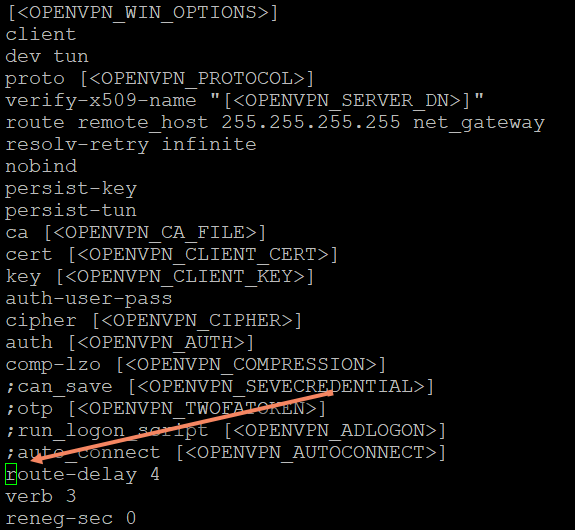
5. Press the letter "i" on your keyboard to enter INSERT mode in vi, and press the semicolon symbol (;) on your keyboard
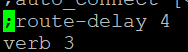
6. Press the key ESC on your keyboard followed by :x or:wq (you should see the :X On the left bottom corner of your screen (Advanced Shell)

After this change, ask the user to access the User Portal to re-download the configuration, and the user won't be presented with the Unsupported Options error when trying to connect.
Note: This won't survive a Firmware update, so you’ll need to re-enter the commands after doing a Firmware Upgrade
Note: Sophos is aware of this error and plans to work on fixing this in the upcoming v19.5MR4 and v20.0MR1.
For UTM Firewall, kindly check the the following link:

